
Core Web Vitals: A Comprehensive Guide for WordPress



Two sites compete for the same keyword. Same depth of content. Same authority. One loads fast, stays stable, and reacts the moment you tap. The other lags, shifts around as it loads, and feels slow to respond.
Google ranks the fast one higher. That tiebreaker plays out millions of times a day, and Core Web Vitals are how Google measures it.
Core Web Vitals have been a confirmed Google ranking signal since 2021. Fewer than half of all websites pass all three thresholds today. If your WordPress site is in that half, you are leaving organic traffic on the table, no matter how good your content is.
This guide covers what the three metrics are, the thresholds you need to hit, how to check your scores, and the specific fixes that pay off fastest on WordPress. There is a checklist at the end that you can reuse every quarter.
What Are Core Web Vitals?
Core Web Vitals are three metrics Google uses to measure how real people experience a page.

The data is not from a lab test. It comes from actual Chrome users visiting your real pages, collected through the Chrome User Experience Report (CrUX) and averaged over a rolling 28-day window. That is why your scores reflect your slowest real visitors, not a perfect test machine.
LCP, INP, and CLS, Definition
LCP (Largest Contentful Paint) measures how fast your main content loads. On most pages, that is the hero image or the main heading. It marks the moment a visitor can see the biggest element fully on screen.
INP (Interaction to Next Paint) measures how fast your page reacts to taps, clicks, and key presses — every interaction during the visit, not just the first one. INP replaced the older FID (First Input Delay) metric and became an official Core Web Vitals in March 2024.
CLS (Cumulative Layout Shift) measures visual stability. If a button jumps just as someone goes to tap it, or text reflows when an ad loads, that is a layout shift. High CLS means your page moves around while it loads.
The 2026 thresholds at a glance
Google grades each metric at the 75th percentile of your real visitors. To pass, 75% or more of visits must land in the “Good” range.
| Metric | What it measures | Good | Needs improvement | Poor |
| LCP | Loading speed of main content | Under 2.5s | 2.5 – 4.0s | Over 4.0s |
| INP | Response to all interactions | Under 200ms | 200 – 500ms | Over 500ms |
| CLS | Visual stability during load | Under 0.1 | 0.1 – 0.25 | Over 0.25 |
These are the thresholds in Google’s current official documentation (Search Central and web.dev).
A note on the “2026 Core Web Vitals changes” you may have read about
You may run into posts claiming Google lowered the LCP target to 2.0 seconds in 2026, or added new metrics like “Visual Stability Index” or “Engagement Reliability.”
We checked Google’s official sources before publishing this. As of now, Google still lists three Core Web Vitals, LCP, INP, and CLS, and still sets the LCP “Good” threshold at 2.5 seconds. The new thresholds and extra metrics show up on third-party SEO blogs, not on Google’s own pages.
Our advice: treat any “new threshold” or “new metric” as a rumor until you can find it on Google Search Central or web.dev. We update this guide when Google updates its docs.
Why Core Web Vitals Still Matter for SEO
They act as Google’s tiebreaker
When two pages are close on content and authority, page experience decides who wins. The faster, more stable page gets the edge. In competitive results, that edge is the difference between page one and page two.
Fewer than half of websites pass all three Core Web Vitals, based on the HTTP Archive Web Almanac, which tracks real CrUX data across millions of sites. LCP is the hardest of the three to pass, and on WordPress, it almost always traces back to images.
The revenue cost is higher than most owners think
Speed is not only an SEO issue. It is a sales issue.
A widely cited figure puts the cost of a one-second LCP delay at around a 7% drop in conversions. For a store doing $50,000 a month, that one second works out to roughly $42,000 a year in lost sales.
Google’s own case studies show the flip side. Rakuten improved LCP and saw a 53% increase in revenue per visitor. RedBus improved INP and lifted sales by 7%. Ray-Ban used prerendering on key pages and more than doubled mobile product-page conversions.
On WordPress, the LCP problem usually starts with one file: a 4MB hero image uploaded straight from a phone, served with no compression and no modern format. That single image can push LCP past three seconds on its own.
Mobile scores carry the most weight
Around 64% of web traffic is mobile, and Google indexes mobile-first. Your mobile scores are the ones that count most.
A site with a 1.8-second LCP on desktop but 3.2 seconds on mobile is still at risk. The fast desktop score does not cancel out the slow mobile one. Sites with heavy, unoptimized images are hit hardest here, because large files slow phones far more than they slow desktops.
A likely knock-on effect: AI search
This part is informed expectation, not a documented Google rule, so treat it as a reasonable bet rather than a fact: slow pages tend to get crawled less often, which leaves less fresh content for AI Overviews and answer engines to pull from. Pages with heavy scripts and intrusive pop-ups also tend to score poorly on quality signals. As AI summaries take up more of the results page, a slow site risks losing visibility in two places at once. Improving Core Web Vitals helps your traditional rankings either way, so this is upside, not a reason to panic.
How to Check Your Core Web Vitals Scores
Start in Google Search Console
Open Search Console and find the Core Web Vitals report under “Experience.” This is your field data: real users, real devices, your whole site.
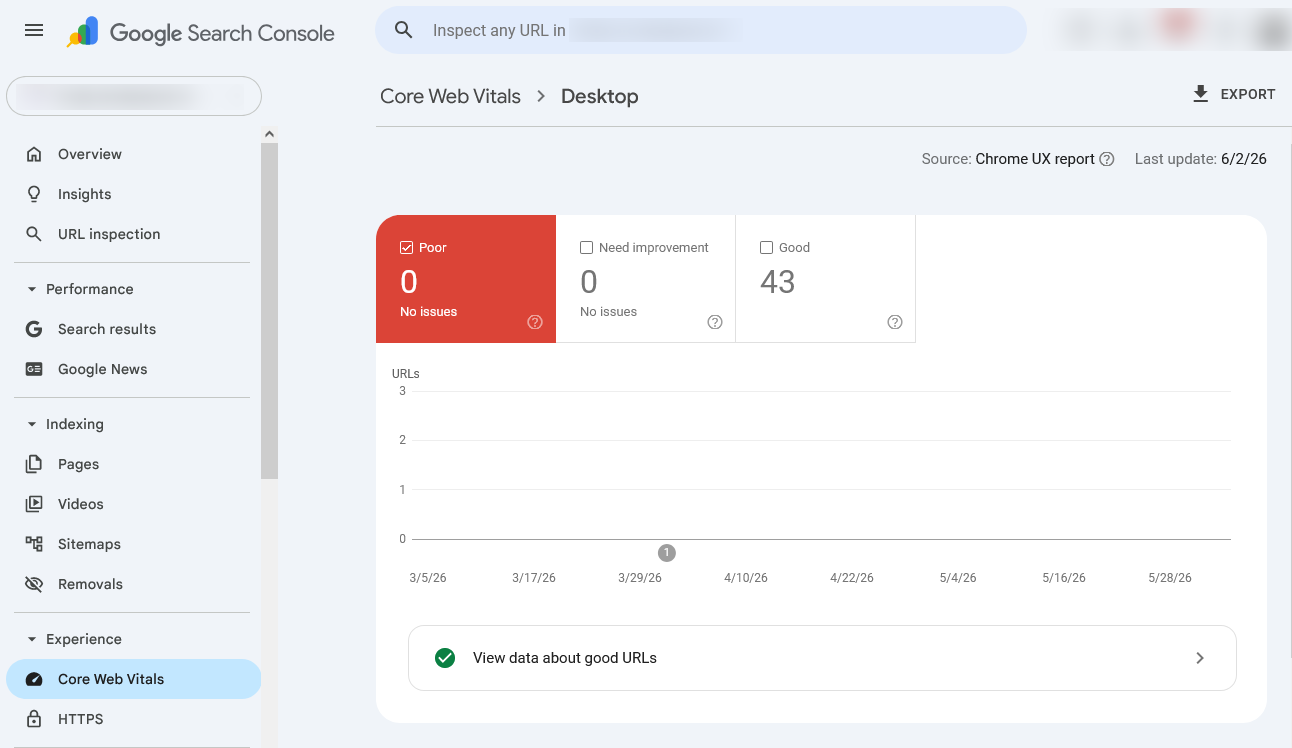
The report sorts pages into Good, Needs Improvement, and Poor. Start with the Poor pages, those carry the highest ranking risk. Once they are clean, move to Needs Improvement.
One thing to expect: fixes take about 4 to 6 weeks to show up here, because Google uses a 28-day rolling window. You will not see same-day changes, and that is normal.
Diagnose single pages with PageSpeed Insights
Run your top five pages through PageSpeed Insights before you change anything. It shows two views: lab data from a simulated test, and field data from real CrUX users.
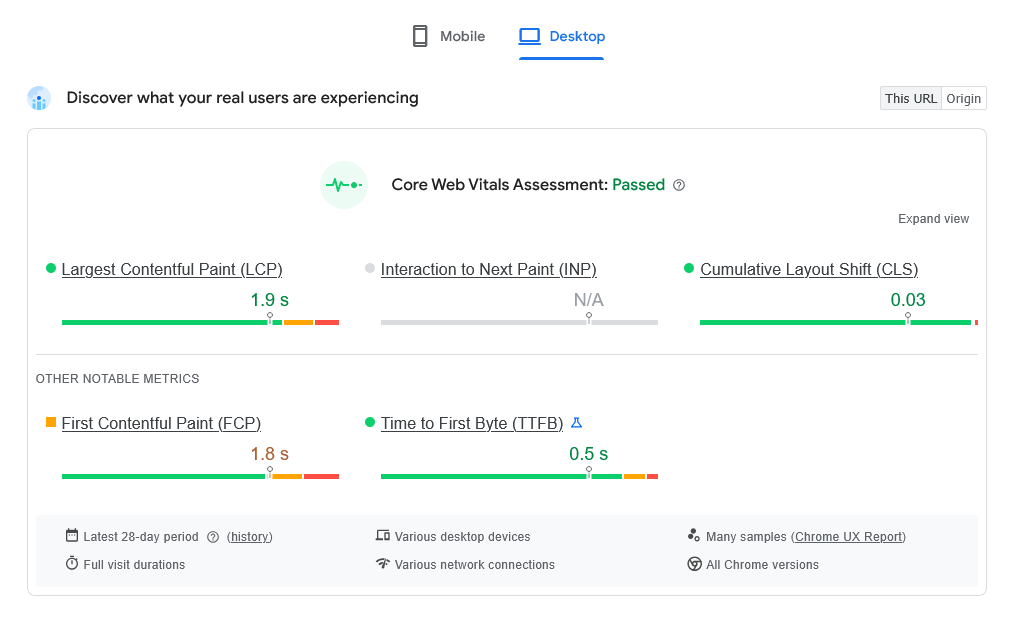
The field data is what affects rankings. Lab data tells you what the page could do under perfect conditions. A big gap between the two means real users are getting a worse experience than the lab suggests.
PageSpeed Insights also names your exact LCP element. Find out which element Google is measuring before you optimize anything. Fixing the wrong element wastes time.
Go deeper with Chrome DevTools
For hands-on debugging, open DevTools:
- Use the Performance panel to find JavaScript tasks that run longer than 50ms on the main thread. Those are your likely INP problems.
- Use the Lighthouse audit to spot render-blocking files that delay LCP.
- Check TTFB in the Network panel. Anything above 200ms points to your server or host, not a plugin. No front-end fix can make up for a slow server response.
Common Core Web Vitals Problems on WordPress
What usually breaks LCP
LCP failures on WordPress almost always come from one of three sources:
- Large, uncompressed hero images served as JPEG or PNG with no priority signal to the browser.
- Slow hosting with TTFB above 400ms, which delays everything regardless of image size.
- Render-blocking scripts from themes and page builders that load JavaScript ahead of your main content.
One mistake worth calling out: applying WordPress lazy loading to the LCP image. Lazy loading holds an image back until it is near the viewport. Used on the hero image, it directly delays LCP. It is a simple fix, but the error sits on a surprising number of sites. If your images are slow to appear in general, our guide on how to make images load faster covers the common causes.
What usually breaks INP
Page builders are a frequent INP culprit. Tools like Elementor and Divi add a lot of JavaScript that runs on every page, even pages where you did not build the layout with them.
Third-party scripts make it worse. Most sites pick up 8 to 15 scripts over time: chat widgets, heatmaps, A/B testing, analytics tags, social buttons. Each one runs JavaScript that can block the main thread and push INP past 200ms. Very large page structures, more than 2,000 elements, add to the problem, because every tap forces the browser to recalculate across the whole tree.
What usually breaks CLS
Images with no width and height set are the most common CLS source on WordPress. When the browser does not know an image’s size ahead of time, it cannot reserve space, so the content jumps down as the image loads.
Other regular offenders: web fonts with no display fallback, which cause text to reflow; and cookie banners or top bars that push existing content down after the page loads. WordPress also creates several thumbnail sizes for every upload, many of which your theme never uses. Trimming those reduces CLS risk and recovers server storage. Our guide on disabling unnecessary thumbnail sizes walks through it.
How to Fix Core Web Vitals in WordPress
Fixing LCP
Images are the LCP element on most WordPress pages, so start there.
Convert hero images to WebP or AVIF. These formats are roughly 25 to 35% smaller than JPEG with no visible quality loss. A hero image that loads in 1.2 seconds as a JPEG can drop under 0.8 seconds as WebP. Our guide on AVIF vs WebP vs JPEG helps you pick the right format for your setup.
Remove lazy loading from the LCP image, then add fetchpriority=”high” to the hero image tag so the browser treats it as the top priority during load. This attribute works in WordPress 6.3 and above.
Fix slow TTFB at the host level. If TTFB is above 200ms, a faster host or a CDN that serves assets closer to your users is the real fix.
Defer non-critical JavaScript and CSS, using your Lighthouse audit to find the files blocking your LCP element.
ThumbPress handles the image side of LCP for you. It converts your media library to WebP or AVIF in bulk without breaking existing image links, and covers compression and upload size limits in one place instead of stacking separate tools. You can start with the free version on WordPress.org. For the full walkthrough, see our guide on how to optimize WordPress images.
Fixing INP
Audit your scripts first. Pull up your tag manager and remove anything without a clear reason to load on every page. For scripts you keep, switch from synchronous loading to async or defer. Load chat widgets on user intent, not on page load. Run heatmap and A/B testing scripts only on the pages that need them.
Break up long JavaScript tasks. Any task that blocks the main thread for more than 50ms hurts INP. Splitting those tasks lets the browser respond to taps in between them.
Fixing CLS
Set the width and height on every image and embed. For videos and iframes without fixed sizes, use the CSS aspect-ratio property to hold space during load.
Trim unused thumbnail sizes so your theme only generates what it displays. This cuts CLS risk and recovers storage.
Handle banners and fonts. Reserve space for cookie notices in the initial layout, or inject them without pushing content down. For web fonts, use font-display: optional or preload the font in the <head> so the browser renders the right font from the start.
For more layout-shift sources on media-heavy sites, see our guide on fixing common image issues in WordPress.
Best WordPress Plugins for Core Web Vitals
Image optimization: your biggest LCP win
Images are the LCP element on most pages, so this is the highest-return category for the least technical effort.

What to look for: bulk WebP and AVIF conversion, compression with no visible quality loss, automatic optimization on upload, and media cleanup for unused files, oversized images, and duplicates. One plugin that covers all of this replaces four or five overlapping tools that can conflict with each other.
ThumbPress covers this in one plugin. The free version handles WebP conversion, thumbnail size control, lazy loading, and upload size limits. Pro adds image compression, bulk AVIF conversion, large image detection unused image cleanup, duplicate detection, and a built-in image editor. (Confirm the current free vs. Pro split on the pricing page before publishing.)
Caching and performance plugins
Caching improves TTFB and cuts server load directly. A good caching plugin handles page and database caching, critical CSS, JS and CSS minification, and deferred scripts, different problems from what an image plugin solves, so you need both.
The most-used options are WP Rocket, LiteSpeed Cache, and W3 Total Cache. Keep in mind that hosting quality still matters more than any plugin for TTFB. A well-tuned caching layer on slow shared hosting is still slow shared hosting. For more on this, see our guide on speeding up your WordPress site.
What a healthy plugin stack looks like
Most WordPress speed problems come from too many plugins, not too few. Every extra plugin adds JavaScript, and every JavaScript file is a possible INP problem.
A practical stack is three tools for three jobs:
- One image plugin for compression, WebP/AVIF, thumbnail control, and cleanup.
- One caching plugin matched to your hosting.
- One CDN, with Cloudflare being the easiest place to start.
Judge every plugin past those three against one question: Does it earn its JavaScript cost?
Core Web Vitals Checklist for 2026
Run through this each quarter to keep performance debt from piling up.
LCP
- Hero image converted to WebP or AVIF
- fetchpriority=”high” set on the LCP image
- Lazy loading removed from the LCP image
- TTFB under 200ms (check the field data in PageSpeed Insights)
- Render-blocking CSS and JS deferred
- CDN enabled for images and static assets
INP
- Tag manager audited; unused or duplicate scripts removed
- Third-party scripts deferred or loaded on user intent
- Long JavaScript tasks (50ms+) found and split or deferred
- DOM size kept reasonable (aim under 1,500 elements)
- Page builder JavaScript minimized on pages that do not use it
CLS
- Width and height set on all images and embeds
- Ad slots and dynamic areas reserved with CSS min-height
- Web fonts using font-display: optional or preloaded
- No content injected above the fold after load
- Unused thumbnail sizes disabled
Monitoring
- Search Console Core Web Vitals report reviewed monthly
- Top five pages run through PageSpeed Insights quarterly
- Field data checked, not just lab data
- Fixes logged so you can match them to score changes
- After a fix, wait 4 to 6 weeks before judging the result
Conclusion
Core Web Vitals are a confirmed ranking signal, fewer than half of sites pass them, and on WordPress, the problem almost always starts with images. That makes images the fastest, highest-return fix available to most site owners.
Here is your first move this week: open Search Console, find your Poor and Needs Improvement pages, and run them through PageSpeed Insights. Look at the field data. In most cases, you will find an unoptimized hero image or a media library full of heavy files.
ThumbPress handles that image side in one plugin, WebP and AVIF conversion, compression, large image detection, unused image cleanup, and thumbnail control, without stacking separate tools that overlap and conflict.
Use the checklist above as a recurring reference. Core Web Vitals are not a one-time fix. The sites that hold their rankings are the ones that treat performance as an ongoing habit.
Frequently Asked Questions
Does image compression directly improve Core Web Vitals?
Yes. LCP is set by how fast your largest visible element loads, and on most WordPress pages, that element is an image. Converting to WebP or AVIF cuts file size by 25 to 35% versus JPEG, and smaller files load faster, which lowers LCP directly. A page with ten heavy PNGs might load in 7 to 8 seconds; after compression and WebP conversion, the same page can drop to 2 to 3 seconds. The change shows up in the PageSpeed Insights field data within 4 to 6 weeks.
What is INP, and why did it replace FID?
FID only measured the delay before the browser responded to the first interaction on a page. Every click after that was invisible to it. INP measures every interaction across the whole visit, so it reflects how responsive a site really feels. Google replaced FID with INP as an official Core Web Vitals in March 2024.
How long until Core Web Vitals fixes show up in rankings?
Google uses a 28-day rolling window of real-user data, so a fix today takes about 4 to 6 weeks to fully reflect in Search Console. The first sign a fix is working usually appears in the field data section of PageSpeed Insights. Search Console catches up after that.
How do I pass the Core Web Vitals assessment?
You need 75% or more of real visits in the “Good” range for all three metrics. Your fastest visitors do not save you, if a meaningful share of users hit slow LCP, poor INP, or high CLS, those sessions drag the score down. So optimize for your harder cases too: mobile users, slower connections, and script-heavy pages.
Did Google change the Core Web Vitals thresholds in 2026?
Not according to Google’s official documentation. As of now, the three metrics are still LCP, INP, and CLS, and the LCP “Good” threshold is still 2.5 seconds. Some third-party blogs claim a lower target or new metrics, but those do not appear on Google’s own pages. Confirm any change on Google Search Central or web.dev before acting on it.
Subscribe to Our Newsletter
Get the latest WordPress tutorials, trends, and resources right in your inbox. No Spamming, Unsubscribe Anytime.

Thank you for subscribing to our newsletter!


Table of Content
- What Are Core Web Vitals?
- LCP, INP, and CLS, Definition
- The 2026 thresholds at a glance
- A note on the "2026 Core Web Vitals changes" you may have read about
- Why Core Web Vitals Still Matter for SEO
- They act as Google's tiebreaker
- The revenue cost is higher than most owners think
- Mobile scores carry the most weight
- A likely knock-on effect: AI search
- How to Check Your Core Web Vitals Scores
- Start in Google Search Console
- Diagnose single pages with PageSpeed Insights
- Go deeper with Chrome DevTools
- Common Core Web Vitals Problems on WordPress
- What usually breaks LCP
- What usually breaks INP
- What usually breaks CLS
- How to Fix Core Web Vitals in WordPress
- Fixing LCP
- Fixing INP
- Fixing CLS
- Best WordPress Plugins for Core Web Vitals
- Image optimization: your biggest LCP win
- Caching and performance plugins
- What a healthy plugin stack looks like
- Core Web Vitals Checklist for 2026
- Conclusion
- Frequently Asked Questions
- Does image compression directly improve Core Web Vitals?
- What is INP, and why did it replace FID?
- How long until Core Web Vitals fixes show up in rankings?
- How do I pass the Core Web Vitals assessment?
- Did Google change the Core Web Vitals thresholds in 2026?