Disable Thumbnails Settings


The Thumbnails settings in ThumbPress let you control which image sizes are generated and kept on your site. This helps reduce unnecessary files and save storage.
To access this section, please go to
WordPress Dashboard → ThumbPress → Settings → Thumbnails
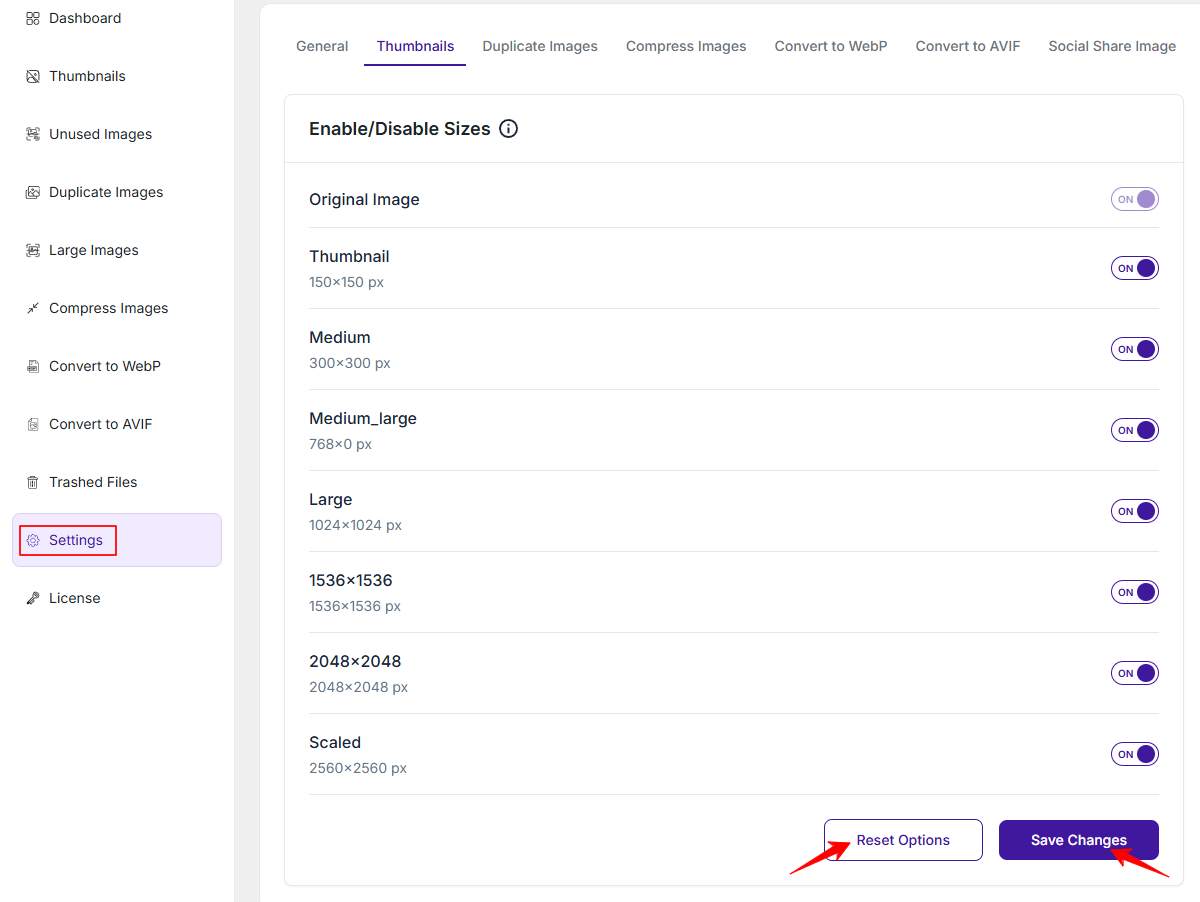
Here you will see a list of image sizes such as Thumbnail (150×150), Medium (300×300), Medium Large, Large and other larger sizes like 1536×1536, 2048×2048, and Scaled.
Each size has a toggle switch:
- ON → The size will be generated and available.
- OFF → The size will be disabled and not created for new uploads.
You can turn off sizes you do not need to optimize storage and improve performance. After making changes please click Save Changes to apply them. If needed you can use Reset Options to restore default settings.
Was this doc helpful?
Subscribe to Our Newsletter
Get the latest WordPress tutorials, trends, and resources right in your inbox. No Spamming, Unsubscribe Anytime.

Thank you for subscribing to our newsletter!